Telegram AI Agent with LangGraph & Supabase
Interest in AI agents and conversational interfaces has surged recently, but most implementations remain confined to web apps or proprietary platforms. We wanted to explore a more open, user-friendly approach — one that runs inside a familiar, everyday tool. Telegram stood out as the ideal environment: it’s widely adopted, cross-platform, open source, and offers a powerful bot API. We built a Telegram-based agent system using Python and FastAPI. It integrates memory, tool calling, web search, speech processing, scheduled tasks, and user permissions — all controllable through natural language, directly within chat.
We used LangGraph to manage the agent’s flow, OpenRouter for LLM model access, AssemblyAI for speech-to-text, and Tavily for web search. For memory and state, we used Supabase. All of this runs in a small Docker setup. We’ve separated the Telegram bot handling, background processing, and scraping tools into individual services so the system remains modular and easy to adapt. If you want to deploy it, it’s straightforward to run locally or host with something like Coolify.
Tech Stack

Telegram Bot API
Provides a robust, free platform with excellent documentation and virtually limitless possibilities for bot development.

FastAPI
Modern, fast web framework for building APIs with Python. Provides automatic interactive API documentation, data validation, and excellent performance for handling webhooks and backend services.

LangGraph
Significantly simplifies developing comprehensive agentic systems. It provides sophisticated workflow orchestration that moves beyond simple chat completions to stateful, multi-step interactions. For production deployments, LangGraph Cloud offers enterprise-grade capabilities with enhanced scaling and monitoring.

OpenRouter
Fantastic for AI development - it provides unified API access to dozens of state-of-the-art language models from different providers. This makes it easy to switch between models, optimize costs, and implement fallback systems without managing multiple API keys.

Supabase
Offers PostgreSQL with real-time capabilities and excellent developer experience. We extended LangGraph’s checkpointing system to work with Supabase, creating a hybrid memory architecture where each user maintains one persistent thread with optimized short-term memory.

AssemblyAI
Provides advanced speech-to-text capabilities.

Tavily
Delivers reliable web search and research capabilities that integrate seamlessly with AI agents.
System Architecture
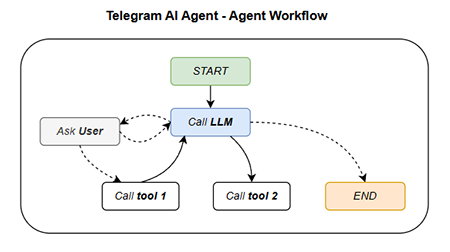
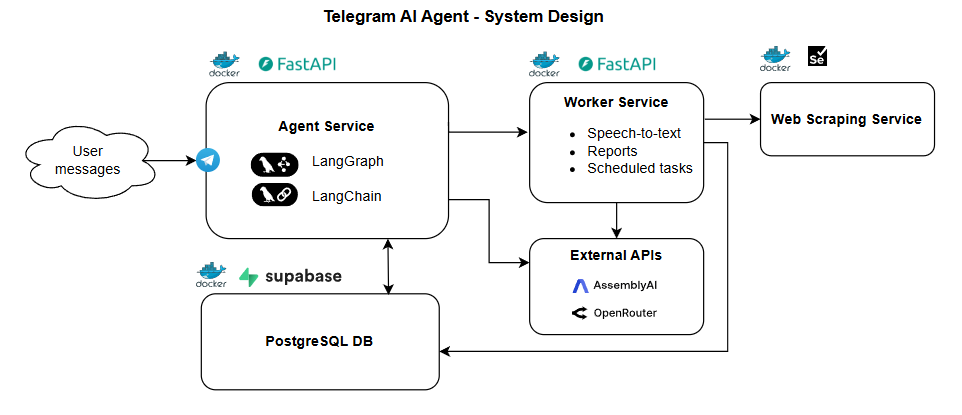
The system demonstrates several key integrations:
- Memory Management: Extended LangGraph checkpointing with Supabase for persistent, per-user conversation threads
- Multi-Modal Processing: Speech-to-text with intelligent summarization for voice messages
- Tool Integration: Web search, market data analysis, file processing, and task scheduling
- User Management: Natural language admin controls - just ask the bot to add or remove users
- Model Flexibility: Dynamic switching between different LLMs based on task complexity through OpenRouter
Getting Started
To try it locally, you’ll need to follow these steps:
Set up Supabase locally
Install the Supabase CLI and start your local instance for the database.
Create your Telegram bot
Register your bot using BotFather on Telegram to get your bot token. Keep this token safe as you’ll need it for configuration.
Install ngrok
Install ngrok to expose your local development environment to the internet for webhooks. This allows Telegram to send messages to your local bot.
Configure environment variables
Copy .env.example to .env and add your API keys including the bot token, OpenRouter API key, AssemblyAI key, and other service credentials.
Register the webhook
Register the webhook with Telegram’s API using your ngrok URL so Telegram knows where to send incoming messages.
Start the services
Run docker-compose up --build to start all three services: the bot handler, backend API, and selenium scraper.
Add an admin user
Create your first admin user either by making an API request to the /create_user endpoint or by manually adding a user through the Supabase Studio dashboard. This user will have administrative privileges to manage other users via natural language.
Open Source
The complete codebase is available on GitHub under the MIT license - Check out the GitHub repository